I’ve spent years watching developers contort Windows into a decent Linux container workstation. It worked, but it was rarely elegant. You either installed a third-party stack, ran a daemon inside a distro, or accepted that the container experience on Windows was always going to feel one layer removed from the platform.
What Microsoft showed at Build 2026 changes that story.
WSL Containers is not just another developer convenience feature. It is Microsoft moving Linux container execution closer to the operating system itself, inside Windows Subsystem for Linux, with both a first-party CLI and an application API. That matters a lot more than the demo buzz suggests.
This Is Bigger Than Another Container Tool
The headline feature is straightforward enough. Microsoft introduced wslc, also aliased as container, as a native way to build, run, and interact with Linux containers on Windows through WSL. The company’s current Learn documentation describes WSL container as a new WSL capability with two major parts: the wslc.exe CLI and a WSL container API that Windows applications can call directly.
That alone is significant. For years, the Windows container conversation has really been two different conversations. There were Windows containers, which solved a specific Windows workload problem, and then there were Linux containers on Windows, which usually meant depending on Docker Desktop, Podman, or a custom setup living beside the OS rather than inside it.
WSL Containers changes the contract. Microsoft is effectively saying Linux containers are now a first-class Windows developer primitive.
Why I Think This Matters
Most people will look at the wslc demo and see a nicer command line experience. I think the more important signal is architectural ownership.
When container execution is built into WSL itself, Microsoft controls the integration surface that developers and software vendors actually care about: process lifecycle, networking, file sharing, GPU access, host integration, and enterprise policy. That is very different from telling developers to install a popular third-party tool and hoping the seams hold.
The Build session showed exactly that direction. Pooja Trivedi demonstrated a familiar workflow: create a Debian container, attach to a shell, detach, kill it, then build a custom image that exposes a web server on localhost. None of that is revolutionary by itself. The important part is that it looked normal.
That familiarity is the feature.
Container adoption accelerates when the workflow stops feeling special. If wslc behaves like the Linux container CLIs developers already know, but ships as part of the WSL update path, Microsoft removes a lot of setup friction from Windows development machines.
The API Story Is the Real Differentiator
The CLI will get the attention. The API is what could make WSL Containers strategically important.
Microsoft also showed that Windows applications will be able to call Linux containers programmatically through a WSL container API, with NuGet packaging for developers. According to Microsoft’s WSL container documentation, that API is intended to let Windows apps pull, run, and interact with Linux containers, including stdin/stdout, file mounts, networking, and GPU access.
That opens a much more interesting future than just “Docker, but bundled.”
Craig Loewen’s demos made that clear. One app launched a Linux-based rendering engine behind a normal Windows executable. Another bundled an AI agent inside a container with a constrained blast radius and controlled host access. In both cases, the user experience was “run a Windows app,” while the Linux runtime appeared and disappeared behind the scenes.
That is a powerful model for ISVs. It means developers can ship Linux-based components as part of a Windows application without forcing end users to understand Linux, install a separate container platform, or manually orchestrate the environment.
If Microsoft executes this well, WSL stops being just a developer tool and starts becoming an application runtime layer.
The Architecture Suggests Microsoft Took Isolation Seriously
The part of the session I paid most attention to was the under-the-hood architecture, because that is where you can usually tell whether a feature is real or just a polished demo.
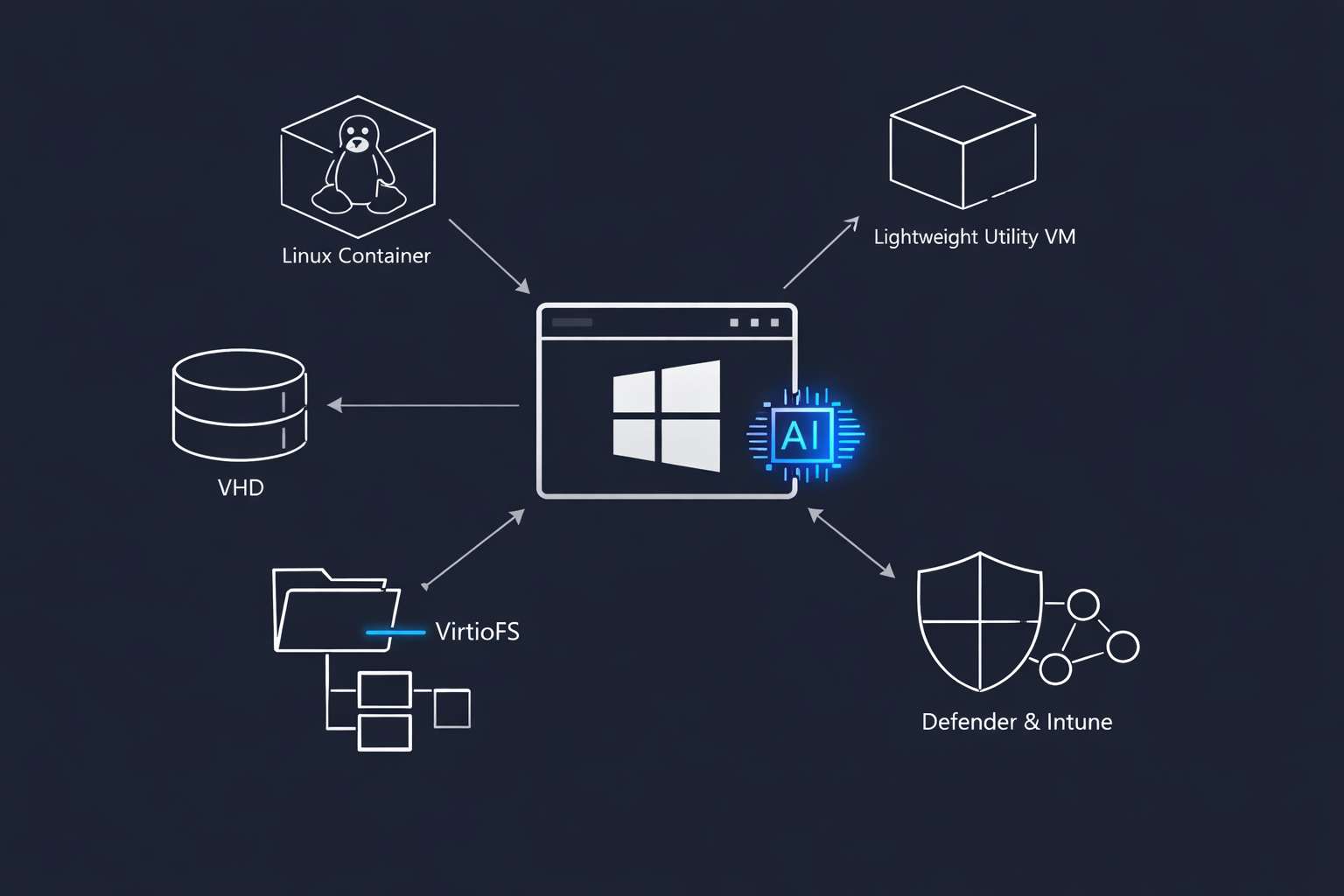
Microsoft said each Windows app requesting a container gets its own lightweight utility VM, creating a hypervisor boundary per application. That is the right design choice. Shared infrastructure is efficient, but per-app isolation is what reduces resource conflicts, networking collisions, and the kind of cross-application leakage that makes enterprise security teams nervous.
The storage model is equally telling. Each app gets its own VHD, and Microsoft said it is using VirtioFS for cross-OS file sharing, with performance roughly twice that of Plan 9 in their discussion. If that improvement holds up outside the demo, it addresses one of the oldest pain points in the Windows-Linux developer story: file system performance across the boundary.
That matters more than people think. A lot of “Windows is slow for containers” complaints were really “cross-boundary file access is slow and inconsistent.” Better file sharing is not cosmetic. It directly affects builds, package restores, dependency installs, and local inner-loop speed.
Enterprise Readiness Is Not a Throwaway Line
One of the more important claims in the session was that WSL Containers is enterprise-ready and works with tools such as Intune and Microsoft Defender for Endpoint.
That may sound boring compared to GPU demos and AI agents, but it is probably the feature’s fastest path into large organisations.
In enterprise environments, container tooling does not win because developers like it. It wins because security and endpoint teams can govern it. Once a built-in WSL container runtime can be discovered, managed, and monitored through the same control plane enterprises already use for Windows endpoints, the conversation changes from “Can we allow this third-party tool?” to “How do we standardise on this?”
That is a very different procurement and governance discussion.
The AI Angle Is More Important Than It First Appears
The GPU-accelerated demo was not there just to look impressive. It was there to make a point.
Microsoft showed a container pulling a GPT-2 model, fine-tuning it, and using the host GPU from Windows. Combined with the application API, that points to a future where local AI tooling on Windows can package Linux-based inference, model utilities, or agent runtimes without asking the user to become a container expert.
That is especially relevant now. More AI developer tools are shipping Linux-first components, and more enterprise teams want local or semi-local AI workflows for security, privacy, latency, or cost reasons. WSL Containers gives Microsoft a better answer to that trend than “install another layer of tooling and hope your machine image allows it.”
The Azure Linux mention at the end of the session also fits that picture. Microsoft separately announced Azure Linux public preview in June 2026 as a Microsoft-built, cloud-optimised distribution for VMs, containers, and cloud-native workloads. Put that next to WSL Containers and you can see the broader shape of the strategy: tighter control over the Linux substrate from local development to Azure-hosted execution.
What I Think Developers Should Watch Closely
I would not overhype this yet. Microsoft’s Learn page still describes WSL container as in development, even though the Build session said public preview is targeted for the end of June. So the real judgment comes later, when people start using it outside of demo conditions.
These are the questions that matter:
Will wslc be compatible enough with existing container workflows that teams can adopt it without relearning everything?
Will the per-app VM model stay lightweight under real developer workloads?
Will VirtioFS materially improve day-to-day file performance for large repos?
Will enterprise management controls be deep enough for regulated environments, not just present in marketing slides?
And will ISVs actually embrace the API, or treat it as an interesting Microsoft-only capability?
Those answers determine whether WSL Containers becomes a foundational Windows developer feature or just another promising Build announcement.
My Read
My view is simple: WSL Containers is the first Windows developer announcement in a while that feels like it changes platform shape, not just developer ergonomics.
If it lands well, Windows becomes a far more credible home for Linux-native developer tooling, AI runtimes, and packaged application components. Not because Microsoft copied the container ecosystem, but because it integrated it into the platform boundary developers and enterprises already manage.
For years, the Windows-Linux story has been about coexistence. WSL Containers suggests Microsoft now wants composition instead.
That is a much bigger idea.
- Getting Started with Containers in Azure
- From Demo to Production with Microsoft Agent Framework for Architects
- Claude Code Users Will Pay Extra for OpenClaw
- Getting Started with Azure OpenAI
- Anthropic’s Revenue Just Hit $30 Billion. Here’s What’s Actually Driving That Growth
